Track every deal. Know every dollar.
Winning keeps your timeshare deals in one place: who wrote each one and when, what each rep earns, whether they've been paid, and this month's bonus levels.
 By Michael Hayes · Virtual Control LLC
© 2026 Virtual Control LLC. All rights reserved.
Getting started
- Install and unlock it on your phone or computer. See Install and Unlocking.
- Set your pay rules once: your rescission period and your payday schedule. See Pay rules.
- Log your deals with + New deal. See Logging a deal.
- Mark reps paid as the money arrives. See Paid / not paid.
Your data stays on your device. Winning never sends your deals anywhere. Download a backup now and then (Settings → Download backup), so a lost or replaced phone doesn't mean lost deals.
Install on your phone
Winning isn't in the App Store or Google Play. You add it straight to your home screen from its web address, which you'll get from the owner. It then has its own W$ icon, opens full screen, and works with no internet.
iPhone
- Open the Winning link in Safari. On iOS 16.4 or later, Chrome, Edge or Firefox also work.
- Tap the Share button.
- Tap Add to Home Screen, then Add.
Android
- Open the Winning link in Chrome.
- Tap Install app on Winning's first screen (it's also in Settings later), or open the browser menu (⋮) and choose the install / Add to Home screen option.
On a computer, open Winning in Chrome or Edge. The owner's computer can use the desktop shortcut.
Always open Winning the same way (the same browser, and the same icon or address). Your deals are saved with that browser.
Unlocking Winning
Winning is a monthly subscription: $20 a month after a 14-day free trial (no card needed for the trial), cancel anytime. Each subscription unlocks one device. The first time you open Winning, you'll see the lock screen with your device code.
On a phone, add Winning to your Home Screen first (see Install) and open it from that icon before you start. That way your account is linked to the copy you'll actually use.
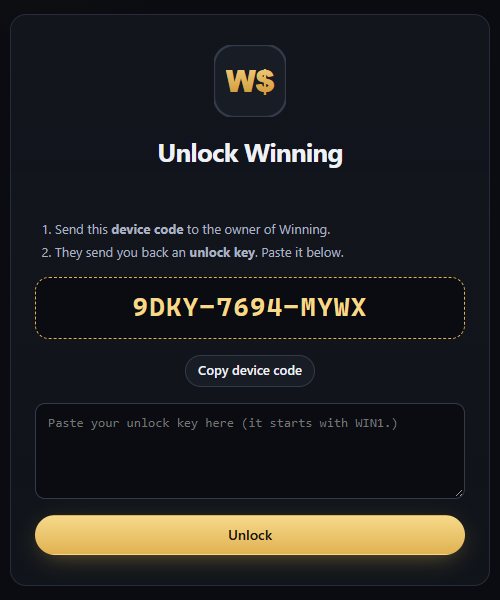
- Tap Start my free 14-day trial. A sign-up page opens with your device code already filled in.
- Enter your name, email and a password, and tap Start free trial.
- Go back to Winning. It unlocks by itself within a few seconds.
To keep Winning after the trial, open your account (Settings → Unlock key → Manage subscription) and tap Subscribe. The first charge comes when the trial ends (if you subscribe in the trial's last 2 days, billing starts right away). Winning renews its key by itself every few days whenever it's online, so there's nothing to paste. Offline, it keeps working until the key's end date, up to about a week.
New phone or computer? Open Winning there, then in your account use Moving to a new phone or computer? with the new device code (once every 7 days). Download a backup on the old device first and restore it on the new one.
Bought Winning before subscriptions? Your key from the owner keeps working as before. Under I have an unlock key on the lock screen you can paste a key from the owner.
If you ever get a new key while Winning is open, go to Settings → Unlock key → Enter a new key.
If Winning is locked and you need your deals, the lock screen shows a Download a backup of my data button whenever there are deals saved.
First time: pay rules
Open Settings → Pay rules. Winning uses these to work out when each deal pays. It never guesses them. Until they're set, deals show "no pay date".
| Setting | What to enter |
|---|---|
| Rescission period | How many days after the sale date commission clears. It depends on your state and contract, so enter your own. |
| Processing lag | Extra days before payroll picks it up. Use 0 if none. |
| Payday schedule | Weekly (pick the day), Every 2 weeks (enter any one real payday), Twice a month (two days of the month), Monthly (one day), or Manual. For "last day of the month", enter 31. |
Underneath, a preview shows what happens to a deal written today, for example "clears Thu, Oct 8 and pays Fri, Oct 9".
Roles & default rates (optional): give a role like Closer or Liner a default rate. Picking that role on a deal then fills the rate in for you.
Logging a deal
Tap + New deal (or press N on a computer).
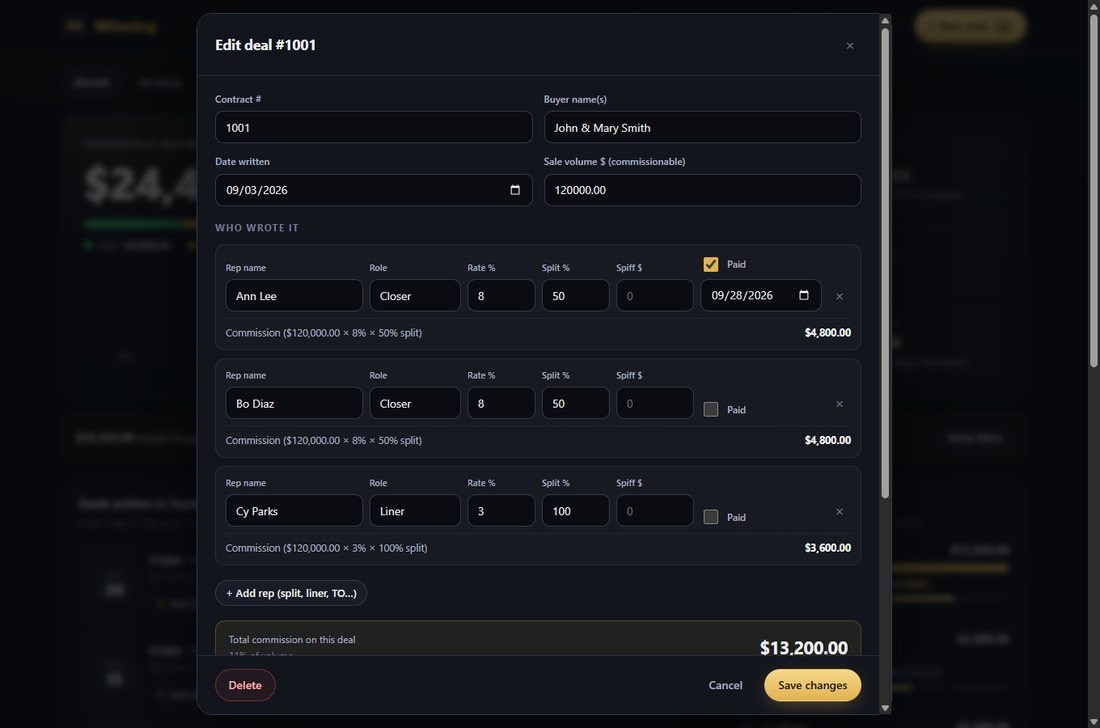
| Field | Meaning |
|---|---|
| Contract # | Your contract number. Winning warns you if it's already been used, and you can still save it if it's really a different deal. |
| Buyer name(s) | Who bought. |
| Date written | The sale date. Everything in Winning is organized by this date. |
| Sale volume $ | The commissionable amount. |
| Who wrote it | One line per rep: name, role, rate %, split % (100 if not split), and an optional spiff $. Use + Add rep for splits, liners and TOs. |
| Paid | Tick it when that rep has been paid, and set the date. |
| Pay date override | Only for a deal that pays off-schedule. |
| Cancelled | Tick it and set the cancel date if the deal falls through. See Cancellations. |
As you type, each rep line shows how its commission is worked out, for example ($120,000.00 × 8% × 50% split), with the amount, $4,800.00, beside it. The deal's total shows at the bottom. The form also shows when the deal clears rescission and its scheduled payday.
Type a rep's name the same way each time. Winning suggests names you've used before, and matches them regardless of capital letters.
Marking paid / not paid
Every rep on a deal shows as a small chip: ○ Not paid or ● Paid. Click or tap a chip to flip it. Marking paid uses today's date (you can change it in the deal), and an Undo button appears for a few seconds.
Paid status is kept per rep, because on a split deal each rep can be paid at a different time. When a rep is marked paid, the amount is locked in. If you edit the deal later, what was already paid doesn't change. To re-lock at the new amount, open the deal, untick Paid, tick it again, and save.
What each status means
| In rescission | Still inside the rescission period. |
| Owed | Cleared and waiting for its payday. |
| Past payday · not paid | The payday has passed but it isn't marked paid. Either mark it, or ask payroll. |
| Partly paid | Some reps on the deal are paid, others aren't. |
| Paid | Every rep on the deal is paid. |
| Owed · no pay date | Your pay rules aren't set yet. |
| Cancelled | Cancelled before anyone was paid. Nothing is owed. |
| Charged back | Cancelled after being paid. See Cancellations. |
The Month screen
This is home. It shows deals written in the month at the top (use ‹ › to change month; tap the month name to jump back to today).
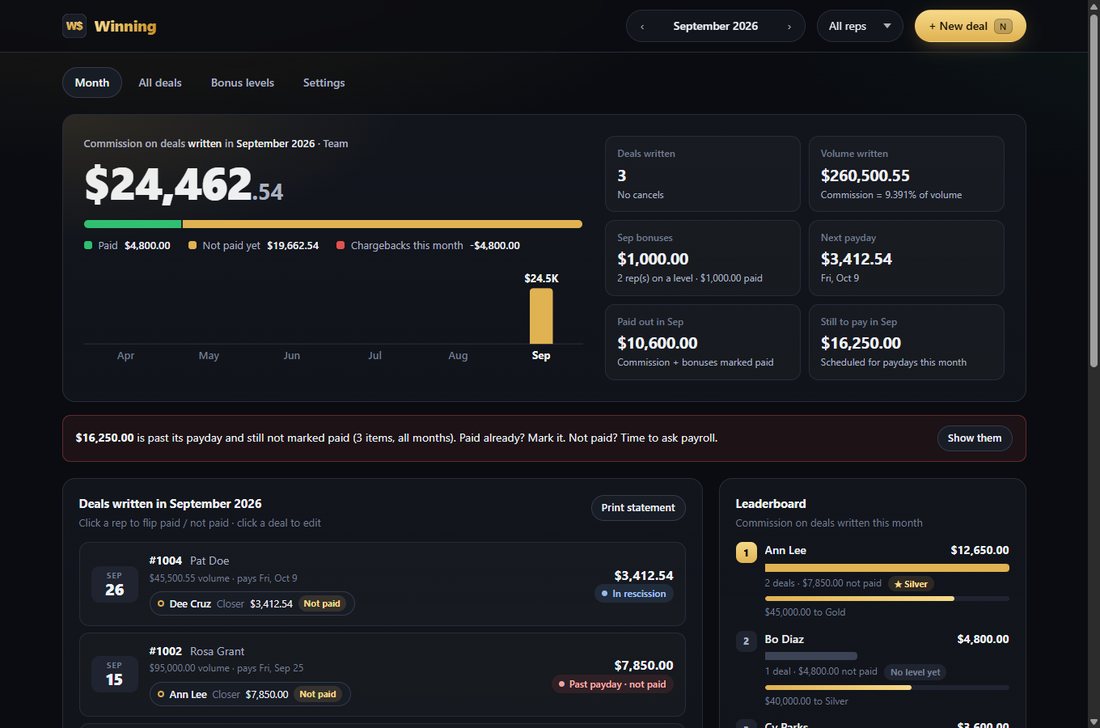
- The big number is the commission on deals written this month. The bar below splits it into Paid and Not paid yet.
- The 6-month chart compares months. Tap a bar to jump to that month.
- The tiles show deals written, volume, the month's bonuses, your next payday and amount, what's been paid out this month, and what's still to pay.
- The red banner appears when money is past its payday and not marked paid. Show them lists exactly which ones.
- Deals written this month: tap a deal to edit it, or tap a rep's chip to flip paid.
- The leaderboard ranks reps and shows each rep's bonus level and how far they are from the next one.
- Paydays this month lists every payday with money on it, including bonuses and chargebacks.
All deals
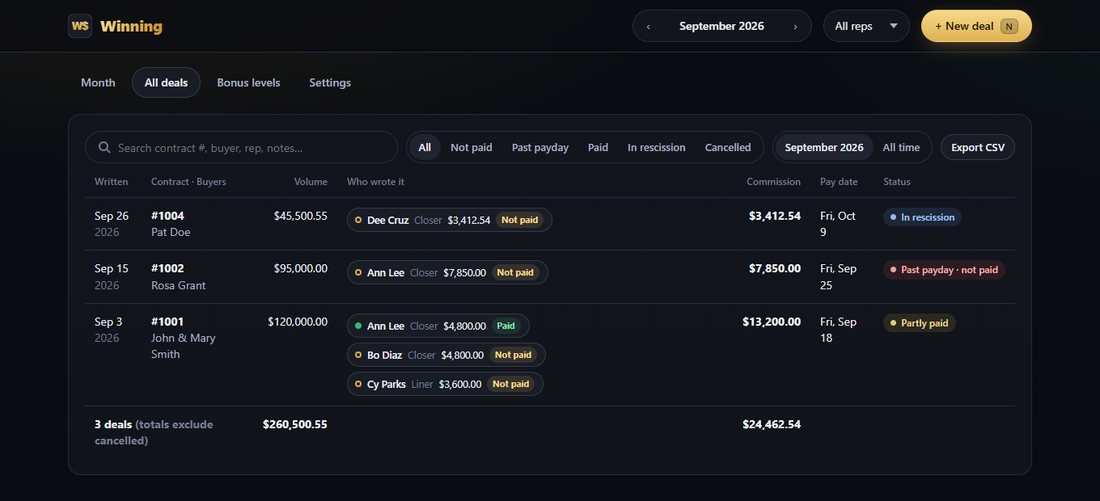
- Search by contract #, buyer, rep or notes.
- Filter: All, Not paid, Past payday, Paid, In rescission or Cancelled, for this month or All time.
- Export CSV opens in Excel.
Bonus levels
Bonus levels change monthly, so each month has its own set. The owner creates them on the Bonus levels tab. When a new month starts, open it and tap the Copy …'s levels button (it names the last month that had levels), then adjust.
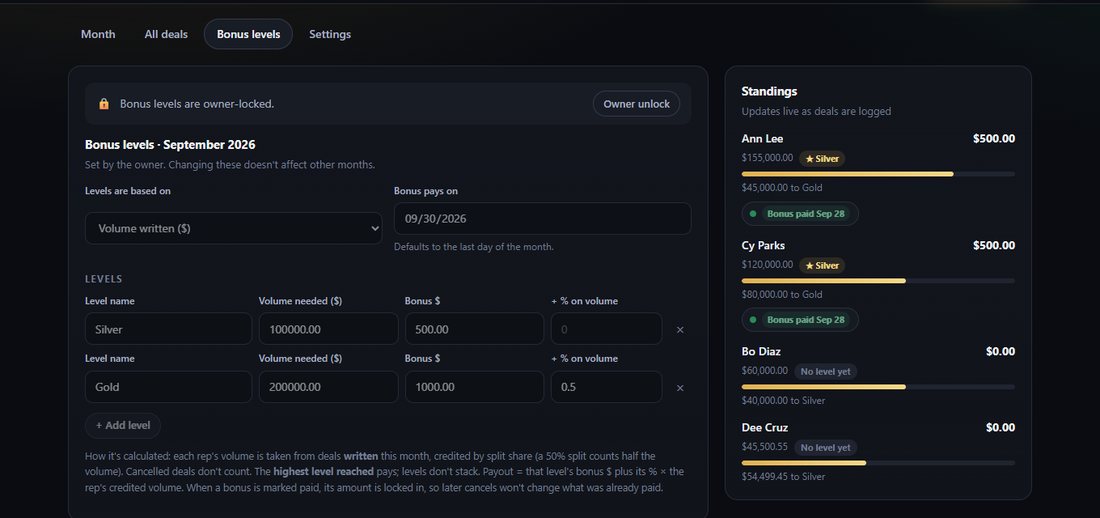
- Levels are based on volume written ($) or number of deals written.
- Each level has a name, a target, a bonus $ and/or a + % on volume.
- The highest level reached pays. Levels don't add together.
- It counts deals written that month, credited by split share (a 50% split = half the volume, or 0.5 of a deal). Cancelled deals don't count.
- Bonus pays on defaults to the last day of the month. The owner can change it.
- In Standings, tap a rep's bonus chip to mark it paid. The amount is locked in when it's paid.
Example: Silver at $100,000 pays $500. Gold at $200,000 pays $1,000 + 0.5%.
A rep with $155,000 credited volume is at Silver: $500, with $45,000 to go to Gold. At $250,000 they'd be at Gold: $1,000 + 0.5% × $250,000 = $2,250.
Cancellations & chargebacks
Open the deal, tick Deal cancelled / rescinded, and set the cancel date.
- Nobody paid yet: the deal shows Cancelled and nothing is owed.
- Already paid: the deal shows Charged back. The amount paid comes off on the cancel date, and it's shown in that month's legend and Paydays list.
The cancel date can't be before the date written, or before a rep was paid.
One rep's view & statements
Pick a rep in the menu at the top (it says All reps). Every screen then shows only that rep: their commission, their split share of the volume, their next payday, and a bonus ladder showing each level and how far they have to go.
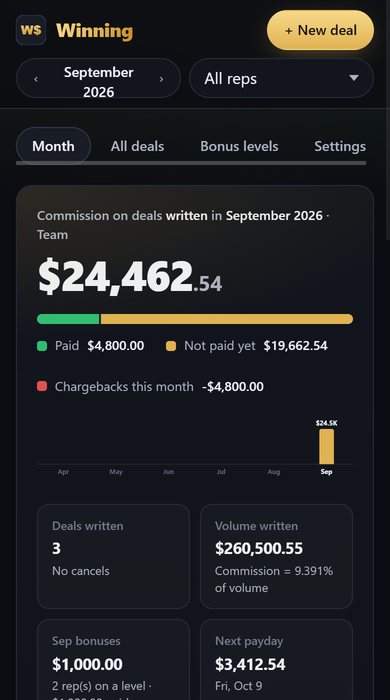
Print statement on the Month screen prints the month for whoever is selected.
Backups, new phones & your data
Everything is saved in the browser on the device you use. Nothing is stored online.
- Download backup (Settings): saves a
.jsonfile. On a phone, the share sheet opens when the phone supports it, so you can save the file to Files or Drive, or email it to yourself. - Restore backup: loads a backup file. It downloads a safety copy of your current data first, and refuses a damaged file without touching your data.
- Export CSV: a spreadsheet of every deal and rep.
- Erase everything: you type ERASE to confirm, and a safety backup downloads first.
Moving to a new phone
- On the old phone: Settings → Download backup.
- On the new phone: install Winning and send the owner the new device code for a new key.
- Unlock, then Settings → Restore backup.
Clearing your browser's website data erases your deals. Keep a recent backup.
Owner lock (PIN)
In Settings → Owner lock, set a 4 to 8 digit PIN. After that, bonus levels and settings can only be changed after Owner unlock. You can also lock deal edits and paid / not-paid marks. The PIN stops accidental changes; it isn't real security.
How the math works
Commission = sale volume × rate % × split % + spiff. It's exact to the cent, and a half cent rounds up.
Example: $120,000 × 8% × 50% = $4,800.00.
Pay date = the first payday on or after (date written + rescission days + lag days).
Example: written Thu Sep 3 with a 10-day rescission clears Sun Sep 13. With weekly Friday paydays, it pays Fri Sep 18.
Bonus = the highest level reached that month: that level's bonus $ plus its % × the rep's credited volume. See Bonus levels.
Cancelled before paid: nothing owed. After paid: a chargeback of the paid amount on the cancel date.
Questions
A deal says "no pay date".
Set your rescission period and payday schedule in Settings → Pay rules, or give that deal a pay date override.
The red banner says money is past its payday.
Tap Show them. If a rep was paid, tap their chip to mark it paid. If not, check with payroll.
Winning says my key is for a different device.
Keys only work on the device they were made for. In your account, move your subscription to the code shown on your lock screen.
Winning says my key expired.
Connect to the internet and open Winning: if your subscription is active, it renews the key by itself. If your trial ended, subscribe in your account. Your deals are still there. If your phone's date was set wrong, fix it first.
"This browser can't check unlock keys here."
Open Winning from its https:// web address in Safari, Chrome or Edge.
I typed a rep's name two ways.
Names match regardless of capital letters. For a different spelling, edit the deals so they match. If that rep's bonus was already paid, Winning asks whether to move the paid bonus to the corrected name.
About Winning
Winning is a commission tracker for timeshare sales teams. It runs entirely on your device, works offline once installed, and has no ads and no tracking. It never sends your deals anywhere. To keep your subscription's key up to date it checks with its account server now and then, sending only your device code; otherwise it only downloads its own app files, from the address it was installed from.
Your version number, who your copy is licensed to, and your device code are on the Help tab in the app.
Winning was created by Michael Hayes, Virtual Control LLC. © 2026 Virtual Control LLC. All rights reserved. Winning, its design, its code and this guide are the property of Virtual Control LLC. Copying, sharing or reselling them without permission is not allowed.
Sold by Virtual Control LLC via savagebiz.com. Using Winning means you accept the licence agreement below.
Licence agreement
By installing or using Winning you accept these terms.
- One device per unlock key. Each unlock key is issued for ONE device, identified by its device code, and works until the end date in the key (or with no end date if the key has none). Using Winning on another device needs another key or another subscription.
- Subscription. A subscription costs the monthly price shown when you subscribe ($20 a month at launch) and renews each month until you cancel. New accounts get one 14-day free trial per device. You can cancel anytime from your account; you keep access until the end of the month you already paid for, and a month that has started is not refunded. See the store's refund policy.
- No copying or sharing. You may not copy, lend, sell, give away, publish or distribute Winning, its files or an unlock key, in whole or in part, without the seller's permission.
- No reverse engineering. You may not decompile, modify or bypass Winning's unlock-key check, except as permitted by applicable law.
- Key end dates. When a key's end date arrives, Winning shows its lock screen until a new key is entered. Your saved deals stay on the device.
- Your figures. Winning calculates commissions, pay dates and bonuses from the pay rules, bonus levels and deals you enter. It does not know your employer's rules; check its results against your employer's official pay records.
- Your data. Deals, settings and the key are saved only on this device, in the browser. Winning sends no deal data to the seller; to renew a subscription key it sends only the device code. Clearing the browser's data erases them, so download backups regularly.
- Limited warranty. Winning is supplied "as is". The seller is liable only for reissuing the unlock key for the purchased or subscribed device until its end date; not for indirect damages or for loss of data on the device.
- Breach. Copying or distributing Winning or an unlock key terminates this licence without refund.
- Governing law. This agreement is governed by the laws of the State of Florida, USA.
Ownership. This program and its content are the copyright of Virtual Control LLC. The licence grants use only; it transfers no ownership.
© 2026 Virtual Control LLC. All rights reserved.
Sold by Virtual Control LLC via savagebiz.com.
Contact: Virtual Control LLC — mhayes@virtualcontrolllc.com